

Free invoice generator
Add your business, client and items. Check the totals and save a clear invoice as a PDF.
- Free, no account
- Your logo and colour
- Stays in your browser
What is an invoice?
An invoice records goods or services supplied and the amount requested from the customer. It identifies the seller and buyer, describes the items and shows prices, tax and payment details. This generator makes a PDF for you to review and send; it does not issue a structured e-invoice, submit tax data or keep an invoice register.
| Document | What it is | When you send it | What to remember |
|---|---|---|---|
| Quote | A price offered for a defined scope of work or goods. | Before the customer agrees to the work. | It is not an invoice or evidence of payment. |
| Receipt | A record of payment received. | When a payment is recorded. | An unpaid invoice is not a receipt. |
| Proforma invoice | A preliminary document showing proposed transaction details. | Before the final invoice, when the situation calls for it. | Do not treat it as the final tax invoice. |
| Invoice | A document recording the sale and amount billed. | At the time required by the transaction and applicable rules. | Keep the issued version and use the correct process for corrections. |
Invoice content, numbering, tax treatment, retention and electronic-invoicing requirements depend on your country and transaction. Check the applicable rules or ask your accountant before issuing it.
From a PDF invoice to a clearer payment workflow
Send a quote your client accepts online. Turn it into an invoice without typing it again, and let them pay it online.
INV-0143
From quote Q-0087, accepted on Oct 30How to create an invoice in three steps
- 1Add the parties and invoice detailsEnter seller and client information, an unused invoice number, issue date and agreed due date. Add a supply date or reference if needed.
- 2List items and check the totalsReplace the example items. Enter quantity, unit price before tax and the correct tax rate. Check the tax breakdown, any amount already paid and the balance due.
- 3Review, save and sendAdd payment instructions and required mentions. Choose Download PDF, then Save as PDF in your browser’s print dialog. Keep a copy and send it yourself.
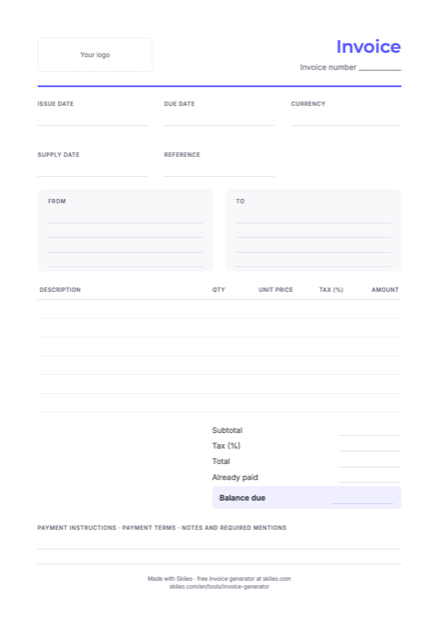
Download a blank invoice template
An empty A4 layout to print and fill in by hand. It is a starting point, not a guarantee of compliance. Use the generator above to type and calculate your invoice.
Invoice template (PDF, 80 kB)Five checks for a clearer invoice
- Use your own numbering sequenceEnter an unused invoice number and record the issued document. This tool saves one draft in this browser; it cannot detect duplicate numbers or maintain your invoice register.
- Describe what was suppliedUse item descriptions the client can recognise. Include the relevant dates or reference so they can match the invoice to the work or order.
- Use the agreed due dateThe quick buttons set a date from the issue date. They are shortcuts, not a statement of legal payment terms. You can choose a different due date.
- Check tax and roundingChoose the appropriate tax label and rate yourself. The tool rounds each line’s net amount to the currency’s precision, groups those amounts by tax rate, then rounds the tax for each group. Confirm this method suits your requirements.
- Keep the invoice and payment recordsSave the issued PDF before changing the draft. For unpaid invoices, use the free payment reminder generator or manage invoices and their email history in Skileo.
What to check before issuing an invoice
These fields support a general invoice. Additional information or a structured electronic format may be required for your business or transaction.
- Seller detailsThe correct business name, address and any required tax or registration identifiers.
- Buyer detailsClient name and billing address, plus tax identification where required.
- Number and issue dateAn unused number from your sequence and the date you issue the invoice.
- Supply and due datesThe supply date if needed, and the payment date agreed with the client.
- Item detailsDescription, quantity, price before tax and appropriate tax rate for every line.
- Amounts and currencyNet subtotal, tax breakdown, invoice total, amounts already paid and balance due.
- Payment instructionsVerified bank details or a payment link, the agreed terms and any reference to quote.
- Required mentions and formatCheck exemptions, reverse-charge wording and any other applicable requirements. A PDF is not a structured e-invoice.
Free tools for your business
Invoice generator questions
Is the invoice generator free?
Yes. Create and print invoices without an account, subscription or paid API. The draft and calculations stay in your browser.
Where is my invoice saved?
One draft is kept in local storage in this browser when available. Nothing you enter is sent to Skileo. Start over clears it. Save every issued PDF separately; anyone using the same browser profile may be able to see the draft.
Can I remove the Skileo credit line?
Yes. Open More options and turn off the credit line. Your exported PDF will omit it.
Does this PDF meet every invoicing requirement?
No single template covers every country, business and transaction. Check required details, numbering, tax treatment and any electronic-invoicing rules. This tool does not validate legal compliance, register the invoice or send it to a tax authority.
Can I download a blank invoice template?
Yes. The free A4 PDF template on this page is empty and intended for printing and handwriting. For typed details and calculations, use the generator.
How are tax and partial payments calculated?
Quantity multiplied by price gives each net line, rounded to the currency’s precision. Net lines are grouped by tax rate and tax is rounded for each group. Already paid is deducted from the total to show the balance. An overpayment is flagged; credit notes are not supported.
Does this send an invoice or create a structured e-invoice?
No. Download PDF opens your browser’s print dialog. Save the PDF, retain a copy and send it through your own channel. This tool does not create structured e-invoices, take payments or transfer the invoice into Skileo automatically.
Have a question? Talk to us.
Your next invoice, easier to follow
Keep quotes, invoices, payment status and email history together in Skileo Accounting.
No credit card needed ✦ No time limit on the Free plan.
Cookies
We use Google Analytics cookies to see how this site is used, so we can improve it. Cookie policy