

Free quote generator
Add your business, your client and your items. Download a clean PDF quote in two minutes.
- Free, no account
- Your logo and colour
- Stays in your browser
What is a quote?
A quote is a written offer to do a piece of work or sell goods at a set price. It lists what you will deliver, the price of each line, the taxes and how long the offer holds. Once your client accepts it, it usually becomes the agreement you both work from.
| Document | What it is | When you send it | Binding? |
|---|---|---|---|
| Quote | A fixed price for a defined piece of work or set of goods. | Before the work, once the scope is clear. | Often, once the client accepts it. |
| Estimate | An approximate price. The final bill may differ. | Before the work, when the scope is still open. | Usually not. |
| Proforma invoice | An invoice in advance, to ask for a deposit or for customs. | Before delivery or payment. | No, it is not a tax invoice. |
| Invoice | A request for payment, recorded in your accounts. | After the sale or the work. | Yes, it is an accounting document. |
What makes a document binding depends on your country and your trade. Ask your accountant when a lot is at stake.
When the quote is a yes
Send a quote your client accepts online. Turn it into an invoice without typing it again, and let them pay it online.
INV-0143
From quote Q-0087, accepted on Oct 30How to make a quote in three steps
- 1Say who you are and who it is forYour business name, address and VAT number, then your client's. Your own details are kept for the next quote.
- 2List the work, line by lineOne line per task or product: what it is, how many, the unit price and the VAT rate. The totals add up as you type.
- 3Download it and send itSave the PDF and attach it to your e-mail. Give it a validity date so your client knows how long the price holds.
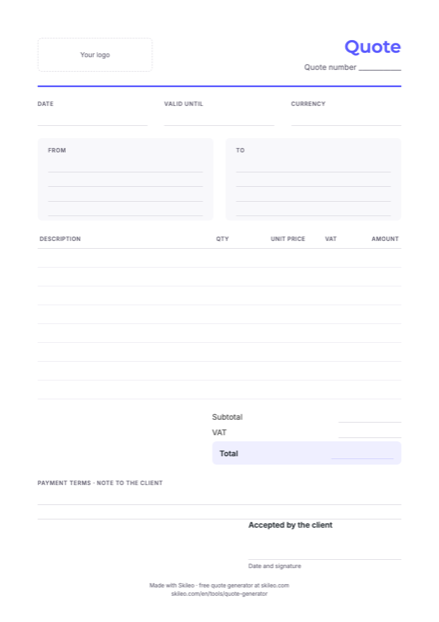
Prefer paper? Download a blank quote template
The same layout, empty, to print and fill in by hand. A4, free, no sign-up. To type it instead, use the generator above.
Quote template (PDF, 88 kB)Five habits of quotes that get accepted
- Send it the same dayA quote that arrives while the conversation is fresh is easier to say yes to.
- Describe the result, not only the tasks“A logo you can use on your website and your van” says more than “logo design, 3 proposals”.
- Give it a validity dateIt protects your prices, and it gives your client a reason to decide.
- Offer two or three optionsA basic and a complete version let your client choose how, not whether.
- Follow up after a few daysA short, friendly message is often all it takes. In Skileo, your client accepts the quote online with one click, and you see it at once.
What to put on a quote
The generator already has a place for each of these. The rules for what a quote must show differ from country to country: check with your accountant.
- Your detailsBusiness name, address, VAT or registration number, how to reach you.
- Your client's detailsThe company or person, with their address.
- A number and a dateSo you both refer to the same quote, and you can find it later.
- A validity dateHow long the price holds. 30 days is common.
- The work, line by lineDescription, quantity, unit price and VAT rate of each line.
- The totalsAmount before tax, the VAT, and the total to pay.
- Payment termsDeposit, when the rest is due, how to pay.
- Room to acceptA signature and date line, or an online Accept button.
Free tools for your business
Questions about quotes
Is this quote generator really free?
Yes. No account and no limit on the number of quotes. It is a free tool from Skileo, the software that runs quotes, invoices, projects and people for small businesses.
Where is my quote saved?
Only in this browser, on this device. Nothing you type is sent to Skileo. Clear your browser data, or press Start over, and it is gone.
Can I remove “Made with Skileo” from the quote?
Yes. Open More options and switch off the credit line. Leaving it on helps us keep the tool free.
What's the difference between a quote and an invoice?
A quote is a price you offer before the work: the client can accept it or not. An invoice asks for payment once the work is agreed or done. In Skileo, an accepted quote becomes an invoice without typing it again.
Is there a blank quote template I can print?
Yes. Download the free PDF template on this page: the same A4 layout, empty, to print and fill in by hand.
How long should a quote be valid?
Long enough for your client to decide, short enough that your prices still hold: 30 days is common, 15 for materials whose price moves, 60 or 90 for large projects.
Can my client accept the quote online?
Not from this page: here you download a PDF to send yourself. In Skileo, each quote gets its own page with an Accept button, you see when it is accepted, and you turn it into an invoice. Skileo's Free plan includes unlimited quotes.
Have a question? Talk to us.
Your next quote, accepted online.
Send quotes your clients accept with one click, then turn them into invoices. Free up to 5 employees.
No credit card needed ✦ No time limit on the Free plan.